Referred, Then Researched: The 10-Minute Credibility Check That Decides Who Gets the Call
Key Highlights
-
Referrals still get your name mentioned, but most homeowners do a quick Google check before they call, and small issues can send them to the next contractor
-
The “credibility check” takes about 10 minutes and usually centers on your Google Business Profile, recent reviews, real job photos, and whether your contact info works
-
A simple 7- to 14-day cleanup (plus 30 minutes a week) can prevent missed calls caused by wrong numbers, duplicate listings, thin websites, and slow responses
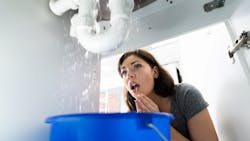
It’s 7:12 p.m. A homeowner is standing in the kitchen with a leak under the sink. Towels are down, stress is up. They do what people do when something breaks fast: they text someone they trust.
“Do you know a good plumber?”
Their neighbor replies: “Call my guy Mike. He’s great.”
That referral still matters. It gets your name mentioned at the exact moment someone is ready to hire. But here’s what happens in many cases: before they tap “call,” they search you up. Right there in the kitchen. They scan your Google listing, your reviews, and your website on their phone. Maybe even AI like ChatGPT. In under 10 minutes they decide, “This looks legit,” or “Something feels off.”
If it feels off, they often do not call Mike. They call the next option.
I work with HVAC, plumbing, and electrical contractors, and this “referred, then researched” moment is where good shops lose easy jobs. Referrals get you in the conversation. Research decides who gets the call.
The Two-Track Trust System
Think of trust in two tracks.
Relationship trust is the referral. It’s built over years by doing clean work, showing up when you said you would, handling problems, and treating people right. It’s why customers recommend you.
Research trust is the quick confirmation. Homeowners use Google to answer basic questions: Are these real people? Do they serve my area? Does their reputation look current? Can I reach them without a hassle?
When relationship trust is strong but research trust looks sloppy, the homeowner feels uncertainty. Uncertainty sends them to the next name, and your office never even knows the call was lost.
The 10-minute Credibility Check
Run this like a homeowner would. Open an incognito browser on your phone and search your business name. Don’t grade yourself on marketing. Grade yourself on “real, current, reachable.”
Google Business Profile Basics
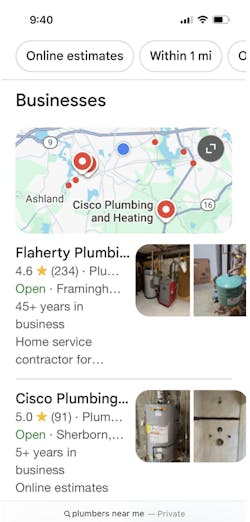
This is usually the first stop. Look at the Google results screenshot below for “plumbers near me” to see the exact screen homeowners scan before they call. This is where your Google Business Profile listing lives.
First, confirm you actually have a Google Business Profile and that you control it. If a homeowner searches your name and nothing shows up, or the listing looks unclaimed or incomplete, that alone can stop the call. Make sure the basics match reality:
-
You have an active Google Business Profile and it is claimed by your company
-
Primary category matches your trade
-
Service areas list towns you truly serve
-
Hours are correct
-
Phone number is correct and rings where it should
-
Website link goes to the right site
-
Services list includes your core work
If any of that looks wrong, homeowners wonder what else is wrong.
Photos: Proof Beats Promises
Photos are evidence. Homeowners want to see a real local operation that takes pride in the job. Keep it simple:
-
Truck with your logo
-
You or your team on site
-
Clean finished installs
-
Before-and-after photos when it helps
-
Protected work areas and tidy cleanup
Avoid stock photos. They make you look like a middleman.Also, do not use AI-generated photos. A good baseline is 15 to 25 real photos on your Google profile.
Reviews: Patterns Matter
Homeowners skim. They are looking for patterns, not a perfect score.
-
Recency: reviews in the last few months
-
Specifics: what you did and how you handled it
-
Owner responses: short, professional replies
Red flags include a long gap with no reviews, reviews that all sound the same, or negative reviews with no response.
Website: Can I Understand You Fast On A Phone?
Most contractor sites lose calls because their website is unclear on mobile. A homeowner wants three answers fast:
-
What do you do?
-
Where do you work?
-
How do I reach you right now?
To ensure your contractor website gets calls, make sure the home page states your trade and service area, includes tap to call, and uses a mobile-friendly contact form. If the site loads slowly or feels vague, people assume it’s a lead site.
Wrong Numbers And Duplicate Listings
This is a quiet revenue leak. Old phone numbers floating around online can steal calls. Duplicate listings confuse people. Mismatched business details can look sketchy even when you’re legitimate. Homeowners may not explain it. They just move on.
Response Readiness: Missed Calls Lose Jobs
Even with a clean online footprint, you lose if nobody answers. Homeowners call while stressed and short on time. If they hit voicemail twice, they start dialing down the list.
At minimum: clear voicemail, fast callbacks, and, if possible, a simple text-back option. Setting expectations helps too: “We call back within 15 minutes during business hours.”
Red Flags That Kill The Call
These are common “nope” signals:
-
Wrong phone number or it routes somewhere strange
-
No real photos, or mostly stock
-
No recent reviews
-
Website is vague or confusing on mobile
-
Broken contact form
-
No clear service area listed
-
Duplicate listings with different info
-
They can’t reach anyone when they try
A Simple Fix Plan For The Next 7 To 14 Days
Days 1 and 2: Run the check. Search your business on your phone. Tap your number. Confirm it works. Fix Google basics: category, hours, service area, website link, services list.
Days 3 and 4: Add proof. Upload 15 to 25 real photos to your Google profile. Focus on truck, team, clean installs, and professional jobsite shots.
Days 5 to 7: Restart review momentum. Ask three recent happy customers for reviews. Then respond to every review with short, professional replies.
Optional week 2: Clean up obvious wrong numbers and duplicates you find online. If your website is thin, add a couple clear service pages for your biggest jobs, and make sure each page states your service area and has an easy contact path.
Keep It Running In 30 Minutes A Week
This is the maintenance that keeps the credibility check from drifting:
-
Add three job photos
-
Ask one customer for a review
-
Respond to reviews
-
Quick search for wrong listings or old numbers
Don’t Let A Strong Referral Die Online
Referrals still win. They get your name mentioned. But the phone rings when the online credibility check makes that referral feel safe.
Run the check on your business from your phone. Fix the handful of issues that create doubt, and you’ll keep more referred jobs from slipping away.
About the Author
Rich Sanger
Rich Sanger owns Streetlight Local and works with contractors and home-service trades, including plumbers and landscapers. He helps service businesses tighten the basics homeowners check before they call, including Google Business Profiles, reviews, and website performance. His focus is practical: keep information accurate, show real proof, and make it easy for customers to reach a real person. His perspective comes from day-to-day work with busy owners.