Four for Efficiency in Office and Field
Key Highlights
- AirMatch provides real-time proposal generation, load calculations, energy analysis, and financing options, streamlining system design and sales
- Clearstory offers a tiered change order management platform with live logs, analytics, and mobile app support
- Corfix delivers compliance and safety reporting tools, including customizable forms, incident tracking, and real-time certification management
- Crew Console simplifies crew scheduling, time tracking, and documentation with a user-friendly interface, SMS notifications, and centralized project files
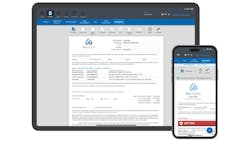
AirMatch (www.airmatch.com 916/877-8170) is an online platform for generating professional proposals in real time, on the fly ready to be DocuSigned or printed, for building AHRI rated systems for unitary and ductless, providing accurate industry standard load calculations.
Maintaining your company pricing and gross margin, the software performs accurate room-by-room load calculations allowing compliance with building codes and proper equipment sizing for various types of structures and provides an energy savings analysis with the customer’s utility bills. In addition, it offers live real-time financing options from a range of partners and automatically provides the homeowner with necessary documentation for rebates. Sales data is exportable to QuickBooks for financial management.
Pricing: monthly and annual plans scaled by number of users.
Clearstory
Clearstory (www.clearstory.build) is a Change Order communication and workflow platform purpose-built for commercial construction. GCs, Specialty Contractors (including plumbing and HVAC contractors) and Owners use Clearstory to streamline T&M Tag and COR (Change Order Request) workflows, align in real time, and get Change Orders closed faster.
Clearstory is available in three tiered plans. The Basic plan is free and offers teams a simple way to get started, with up to five T&M Tags and five Change Order Requests each month. The Standard plan unlocks unlimited Change Orders and adds powerful tools for pricing, sharing, and tracking change events across projects. The Professional plan is built for enterprises managing projects across multiple offices and includes advanced features.
All plans provide a live COR log that links to every COR PDF, version history, and documentation trail, helping teams move faster on approvals, protect revenue at risk, and build trust with project stakeholders. The Standard plan adds change notifications, analytics and reporting, and tools to manage company labor, material, and equipment rates. The Professional plan includes everything in Standard, plus features built for scale like multi-office management, API access, integrations, and configurable allowances.
Clearstory’s mobile app and cloud-based T&M log allow field teams to capture photo documentation and digital signatures for field-directed work. T&M Tags can be linked to CORs using pre-approved rates or created from scratch. The platform’s reporting tools provide insights such as days aging, read receipts, and contract summaries to support billing and project reviews.
Pricing: the Basic plan is free. The Standard and Professional plans, which include training, custom reporting, API access, and single sign-on, are billed annually.
Corfix
Corfix (www.corfix.com) is a platform for the construction industry, including subcontractors, that offers compliance and accident reporting from the field, time tracking, and the ability to track compliance in real time.
The software has numerous fully integrated features including dozens of pre-built templates along with the ability to generate custom safety forms tailored to your workflows, real-time certification grading, and QR code binders with version control. Certifications are stored, tracked, and accessible in the field, and supervisors can verify compliance instantly, and receive expiration alerts.
The software provides digital job hazard analyses, fall protection checklists, and refrigerant handling logs. Crew members can fill out reports onsite from their phones, complete with photos, signatures, and GPS location. Incident information fields include data & time; address; name of employee; job title; and incident description. As soon as a form is submitted, it appears in the dashboard, with flagging for high priority issues. Dozens of pre-built form templates. You can require safety documentation from crew before punching out.
Pricing: subscription-based customizable plans. Demo available.
Crew Console
Crew Console mobile app is a platform configured to manage crews and projects in the field on any web-connected device. Designed for teams that meet at a central shop, it handles crew scheduling utilizing a simple drag-and-drop interface, time keeping, and job tracking. Capabilities include SMS notifications, a “big screen” view, and centralized documentation.
With SMS Notifications, once you assign personnel and equipment to a job on the whiteboard-style calendar, a single click sends a text notification to the entire crew.
While field employees can use the app to view their schedules (employees can scan a QR code next to their name and have their weekly schedule texted to them instantly) , according to the developer the text option is often preferred, enabling crew members to know directly from the text what they are doing and who is going with them, and can navigate to the project location.
With centralized documentation, schedulers can attach photos, notes, plans, and videos to specific jobs. Field employees can access these documents in one place and upload their own files or photos directly from the job site.
Included advanced scheduling tools enable schedulers to easily track availability and receive alerts for double booking. If a project runs over, “downstream” jobs can be pushed back without rebuilding the entire schedule. A labor forecasting tool helps visualizing upcoming workloads to determine if you need to adjust staffing levels.
Pricing: fee per month/person. Free trial available.
About the Author
Patti Feldman
Patti Feldman writes articles and web content for trade magazines and manufacturers of building products.